Patient Portals for Medspas: Features and Launch Questions
Build a med spa patient portal requirements matrix, test privacy and access controls, and score launch readiness with an original 100-point clinic framework.
Editorial method: Our team analyzed current HealthIT.gov, HHS, FTC, NIST, and W3C sources on July 29, 2026. We ran search-result checks only to confirm owner intent and did not conduct hands-on product tests. We built the journey map, requirements matrix, 100-point score, and 48-point checklist as original editorial tools for this guide. The featured artwork was generated for TheClinify with OpenAI ImageGen and contains no vendor assets. This guide is not clinical, legal, privacy, security, or compliance advice.
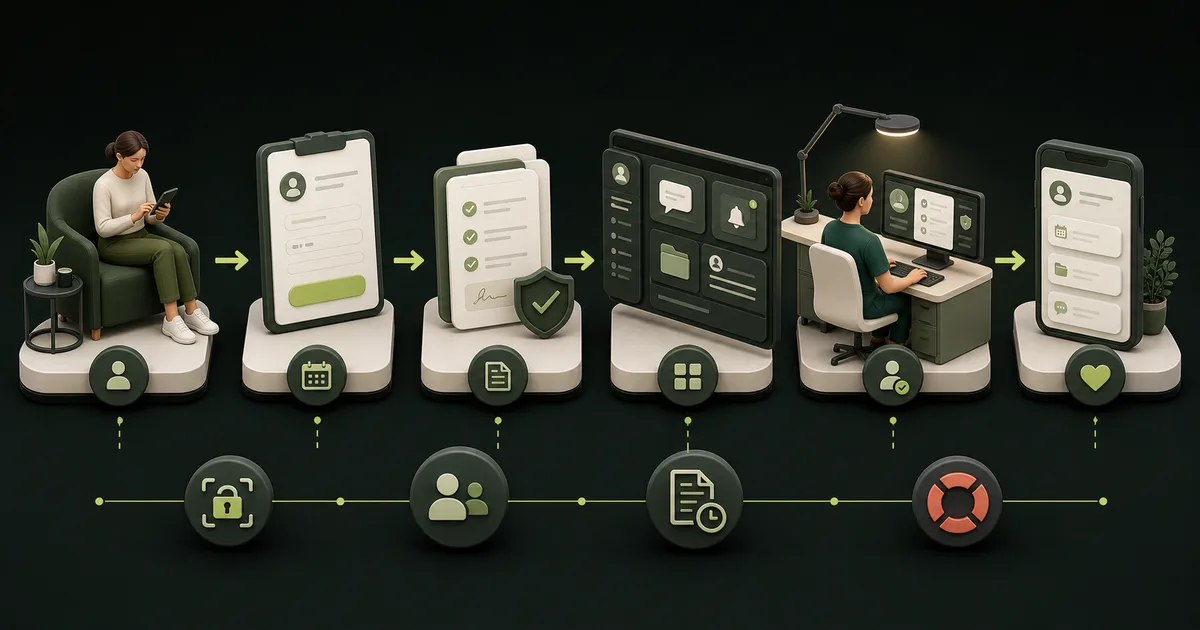
- A booking link becomes a patient portal only when authenticated patients can reach approved health or care information and related services.
- Map enrollment, intake, appointments, messages, documents, payments, follow-up, and support before comparing feature lists.
- Make every finalist prove identity recovery, role access, audit history, integrations, exports, downtime, and offboarding with the same script.
- Software can support clinic controls, but it cannot decide the clinic's legal, clinical, privacy, or security duties.
What is a med spa patient portal?
A med spa patient portal is an authenticated online space where a patient can reach approved health information and clinic services. HealthIT.gov defines a patient portal as a secure website that provides access to personal health information. It says portals may also support secure messaging, non-urgent appointments, payments, forms, and educational materials. See the federal patient portal definition.
That definition sets a useful boundary. A public booking page, promotion dashboard, or generic client login is not automatically a patient portal. If the account exposes forms, treatment records, messages, photos, prescriptions, lab information, or other sensitive material, the clinic needs a documented identity, access, data, and support model around it.
The portal should serve a real patient task without creating a second unreliable record. Start with the patient journey, then decide which system should own each event. Use the broader medical aesthetics software requirements checklist when the project also includes charting, payments, inventory, or staff operations.
How is a portal different from booking software, an EHR, and a client area?
The difference is the job and the source of truth. Booking software manages appointment rules. An EHR or clinical record system manages the clinical record. A patient portal exposes approved parts of a connected workflow to the patient. A client area may handle loyalty, retail, memberships, or general account details without providing health-record access.
One product may cover several layers, but the clinic should still name the owner of each record. The medical aesthetics booking software guide shows why service choice, provider rules, rooms, deposits, and exceptions need their own acceptance test. A portal does not repair a booking model that already routes the wrong patient to the wrong visit.
What should the full patient portal journey look like?
A complete journey begins before sign-in and ends after staff close the patient request. The patient must know why to enroll, how to get help, what the portal can handle, and where to go for urgent or out-of-scope needs. Staff need an equally clear queue, owner, service level, fallback, and audit trail.
Use the featured illustration as a starting map, then replace its generic stages with the clinic's systems and roles. Test one new patient, one returning patient, and one access-recovery case. The clean path is useful, but the recovery case shows whether the clinic can protect the account without abandoning a patient who changed a phone number or lost email access.
| Journey stage | Patient action | Clinic-owned result | Failure to test |
|---|---|---|---|
| Discover and enroll | Open the correct portal, accept the invitation, and establish an account. | One account matches one intended record under the approved enrollment rule. | Expired invite, duplicate record, wrong date of birth, or reused link. |
| Schedule and prepare | Choose or confirm a visit and complete assigned forms. | Correct appointment, packet, version, signature, and review status. | Wrong service, incomplete form, failed deposit, or changed appointment. |
| Access and communicate | Read an approved document or send a message. | Authorized release plus a routed, timestamped staff task. | Unread message, unavailable file, urgent request, or unauthorized role. |
| Complete and follow up | View an approved receipt, instruction, task, or next visit. | The source system and portal show consistent status. | Delayed integration, corrected record, refund, or failed notification. |
| Get help or exit | Recover access, request another format, or stop using the portal. | Support, export, retention, and deactivation follow the written process. | Identity mismatch, downtime, complaint, or vendor termination. |
Which features belong in a portal requirements matrix?
A feature belongs in the matrix when a named patient or staff role needs it to complete an approved workflow. Record the source system, data involved, pass condition, fallback, owner, and evidence. "Secure messaging included" is a product label. "A message about an appointment reaches the front-desk queue, records delivery, and displays the urgent-use limit" is a test.
Use the smallest complete scope. A cash-pay aesthetics clinic may need appointments, intake, approved documents, payments, and service messages. A clinic with prescriptions, lab results, clinical photos, or more complex follow-up may need different record, release, proxy, and escalation controls. Qualified clinical and legal owners should decide those boundaries.
| Requirement group | Minimum question | Evidence before launch |
|---|---|---|
| Enrollment and identity | Who may create, match, recover, proxy, suspend, and close an account? | Normal, mismatch, duplicate, recovery, and revoked-access demonstrations. |
| Appointments and intake | Which service rules select the visit and form packet? | Mobile booking plus reschedule, cancellation, incomplete form, and failed-payment cases. |
| Records, photos, and consent | What can be viewed, signed, uploaded, released, corrected, retained, and exported? | Versioned sample, permission test, audit entry, and opened export. |
| Messaging and notifications | Which queue receives each message and what happens if delivery fails? | Routing matrix, urgent-use notice, unread-item handling, and failure task. |
| Payments and account details | Which system stores the transaction and what can the portal display? | Source match, refund or balance exception, receipt, and reconciliation report. |
| Support, continuity, and exit | Who helps patients during recovery, outage, or vendor transition? | Support script, downtime exercise, backup evidence, export terms, and deletion schedule. |
What privacy, security, and legal boundaries must be resolved?
Start by determining which entity, relationship, data, and workflow are in scope. HHS says HIPAA applies to covered entities and business associates, and a health care provider is a covered entity only when it meets the definition and transmits information in an adopted electronic transaction. A business outside those definitions does not become HIPAA-regulated merely because its product handles health information. Review the HHS coverage guidance with qualified counsel.
For regulated entities, the current HIPAA Security Rule requires appropriate administrative, physical, and technical safeguards for ePHI. HHS still labels the January 2025 Security Rule change as a proposed rule on its page reviewed March 19, 2026, so buyers should distinguish current requirements from proposed changes. See the HHS Security Rule page.
A non-HIPAA answer is not the end of the review. The FTC says its Health Breach Notification Rule covers certain vendors of personal health records, related entities, and service providers outside HIPAA when the rule's definitions are met. The FTC also warns businesses against unsupported "HIPAA Compliant," "HIPAA Secure," or "HIPAA Certified" claims. Use the FTC health-data guidance and state-specific advice for the exact model.
Tracking technology needs its own review. HHS says that when a tracking tool on a regulated entity's portal login or registration page collects login or registration information, that collection is a disclosure of PHI subject to the HIPAA Rules. Its current online tracking guidance also explains the court decision that limited part of the guidance for unauthenticated public pages, so buyers should not apply one blanket rule to every page.
- Map each data type from the public website through enrollment, authentication, use, reporting, and deletion.
- Name the clinic, vendor, subcontractor, and integration responsibility for every safeguard and response step.
- Review tracking, analytics, chat, support, and session-replay tools separately on login, registration, and authenticated pages.
- Keep legal conclusions, clinical content approval, and security risk acceptance with qualified clinic owners and advisers.
Which identity and access controls should a vendor prove?
Identity controls should follow the risk of the portal, not a generic password policy. NIST SP 800-63B-4 is written for digital identity services and federal use, but it provides a useful benchmark: passwords are not phishing-resistant, AAL2 requires two distinct factors, and services assessed at AAL2 must offer a phishing-resistant option. Private clinics should set requirements through their own risk, legal, and technical review. Read the current NIST authentication guideline.
Test patients and staff separately. Patient enrollment, recovery, and proxy access need usable support. Staff accounts need unique identities, role limits, prompt removal, and searchable events. Shared credentials erase accountability. A portal buyer should watch the test happen in the proposed plan and configuration, then retain the setting, audit sample, and written responsibility.
Which system should own portal data and integrations?
Every shared field needs one authoritative owner. The portal may display an appointment, form status, balance, or document, but it should not create a competing version unless the clinic has an explicit reconciliation rule. Record the direction, timing, error handling, support owner, and correction path for every connection.
Replace "integrates with" with an event test. Create, change, cancel, fail, and correct the event. Then open the source and destination reports. The medical aesthetics software buying guide adds migration, contract, 12-month cost, and exit questions. If portal activity changes inventory, use the separate inventory workflow guide to verify units, locations, and history.
| Shared event | Likely source of truth | Portal acceptance test |
|---|---|---|
| Appointment status | Booking or practice system | Create, reschedule, cancel, and restore without duplicate or stale status. |
| Form and signature | Clinical or document system | Show assigned version, signer, time, review state, correction, and export. |
| Message and task | Portal or clinical communication queue | Deliver, route, escalate, close, reopen, and preserve the history. |
| Balance and payment | Payment or practice system | Display the correct amount, process the approved action, and reconcile an exception. |
| Document or photo | Clinical or approved file system | Release, restrict, replace, download, retain, and export under the written policy. |
| Lead or campaign context | Website and marketing analytics | Carry only approved context without sending clinical portal details to marketing tools. |
How does the 100-point Portal Proof Score work?
Rate each finalist from 1 to 5 in the six categories below. Convert the rating to weighted points with this formula: rating divided by 5, multiplied by the category weight. A rating of 4 in a 25-point category earns 20 points. Score the quoted plan and demonstrated configuration, not the vendor's broad feature library.
The Portal Proof Score is an original editorial decision tool, not an industry standard. Change weights before the first demo. A failed launch blocker should override the total, and a roadmap item should earn zero until it is live, included, priced, and shown. Keep a source for every awarded point.
- Disqualify a system that cannot prevent an identity mismatch from exposing the wrong record.
- Disqualify a system that needs shared staff credentials for normal work.
- Disqualify a system that cannot produce the records and history the clinic must retain or move.
- Disqualify a system whose launch depends on an unowned privacy, clinical, security, or integration decision.
| Score category | Weight | Evidence required for a top score |
|---|---|---|
| Patient journey and accessibility | 20 points | New, returning, recovery, mobile, keyboard, error, support, and fallback paths pass. |
| Identity, privacy, and access | 25 points | Coverage review, agreements where applicable, authentication, roles, audit, tracking, and incident duties are documented. |
| Workflow and staff ownership | 20 points | Forms, appointments, messages, documents, payments, follow-up, and exceptions reach named owners. |
| Data, integration, and exit | 15 points | Field ownership, failure handling, opened exports, retention, deletion, offboarding, and fees are clear. |
| Implementation and support | 10 points | Pilot, training, patient help, downtime, escalation, launch, and post-launch reviews have owners. |
| Cost and business fit | 10 points | Full first-year cost and tradeoffs fit the clinic without rebuilding systems that already work. |
What should every vendor prove in a live portal demo?
Give every finalist the same sanitized script and use the proposed plan, roles, and integrations. Begin on a phone-sized public service page, follow the handoff into enrollment, complete a form, send a message, change an appointment, open a document, review a payment item, and close the staff task. Count workarounds and unowned handoffs, not clicks alone.
Then break the path. Expire the invitation, enter mismatched identity data, remove a factor, use the wrong role, interrupt an integration, leave a message unread, open the portal on a shared device, and request an export. A prepared product tour rarely covers these cases, but clinic staff will face them after launch.
- Show what a patient sees before sign-in, after sign-in, during an error, and when the portal is unavailable.
- Prove which staff queue receives each action and how the owner knows it is unresolved.
- Inspect a form version, signature event, message history, access event, corrected record, and notification failure.
- Review every tracker and third-party script on login, registration, and authenticated pages.
- Open a representative export outside the product and match its fields to the clinic data dictionary.
- Put unresolved items, plan limits, setup work, support duties, and added costs in the decision file.
How should a clinic launch the portal without disrupting patients or staff?
Launch one proven journey to a controlled group before broad enrollment. Use sanitized tests first, then a small pilot under the clinic's approved process. Staff should complete their own role scripts. The implementation team should observe rather than take over, because a workflow that only the builder can operate is not ready.
Patient communication should explain the portal's purpose, enrollment steps, support path, response expectations, urgent-use limit, and alternative access route. Do not force all help through the same account the patient cannot enter. Train staff for normal work plus identity mismatch, access recovery, unread messages, downtime, and data correction.
Test accessibility as a workflow. W3C advises using WCAG 2.2 for current web accessibility work. It covers perceivable, operable, understandable, and compatible content, including new criteria for focus visibility, target size, redundant entry, and accessible authentication. Use the WCAG 2.2 standard as a technical target, then obtain advice on the clinic's legal obligations.
When does an off-the-shelf portal fit better than custom software?
An off-the-shelf portal is usually the better first choice when it already connects to the clinic's authoritative record, passes the required workflows, supports usable exports, and leaves only minor configuration gaps. Replacing that foundation with custom code adds authentication, security, maintenance, support, integration, monitoring, and exit responsibilities.
A focused custom portal may fit when a stable, valuable workflow cannot be demonstrated in standard products and the clinic can name every system boundary, acceptance test, owner, and maintenance duty. Custom should solve the narrow difference. It should not quietly become a new EHR, payment processor, messaging platform, and analytics warehouse.
The TheClinify Portal is discovery-priced because modules, users, integrations, patient-facing functions, data responsibilities, and support scope vary. Bring the requirements matrix to discovery. If the standard platform already covers the work, the right recommendation may be to improve the public website handoff instead of building another system.
| Option | Strong fit signal | Risk to price and test |
|---|---|---|
| Portal included with the clinic system | It uses the authoritative record and passes the clinic script with minimal duplication. | Plan limits, patient experience, configuration depth, support, and export scope. |
| Connected specialist portal | A distinct workflow needs deeper capability and the integration has an owner. | Duplicate records, delayed events, vendor handoffs, and two support queues. |
| Custom patient portal module | A narrow stable workflow has measurable value and standard tools fail the acceptance test. | Identity, security, maintenance, integrations, incident response, and long-term ownership. |
| No portal yet | The clinic lacks a stable source record, process owner, or patient support model. | Manual work continues, but a rushed portal would automate confusion and create new exposure. |
How should success be measured and the checklist used?
Measure whether the portal completes the intended work accurately and safely. Useful operating measures include successful enrollments, recovery cases, completed assigned forms, unresolved messages, failed notifications, appointment-change exceptions, support contacts, accessibility defects, duplicate records, integration errors, and export issues. Do not invent an industry benchmark. Establish the clinic's baseline and watch the failure queue.
Download the 48-point med spa patient portal requirements checklist. Mark each row Required, Conditional, or Out of scope. Assign one clinic owner, write a pass condition before the demo, and attach the evidence. Reuse the same file for vendor selection, configuration, pilot approval, launch, and the 30-day review.
Keep the checklist with the journey map, data dictionary, role matrix, legal and security review, final quote, agreement, integration scope, export sample, patient communication, training record, downtime plan, and decision memo. The portal is ready when those pieces describe one operating system that staff can support after the implementation team leaves.
FAQ
Does every medspa need a patient portal?
No. A portal is useful when authenticated self-service solves a real patient and staff workflow. A clinic may be better served by a strong booking handoff and existing record system if it cannot yet define portal ownership, data boundaries, support, and failure handling.
Is a booking page the same as a patient portal?
No. A booking page manages appointment requests or scheduling. A patient portal provides authenticated access to approved health information or related clinic services. One product may include both, but appointment rules and patient-record access still need separate ownership and tests.
Does a patient portal make a medspa HIPAA compliant?
No. Software cannot make the clinic compliant by itself. HIPAA status and duties depend on the entity, transactions, data, relationship, and workflow. Covered entities and business associates must operate applicable safeguards, agreements, policies, risk management, training, and response processes.
What is the most important patient portal security feature?
No single feature is enough. Begin with correct record matching, strong authentication, separate staff accounts, role-based access, searchable audit history, secure recovery, incident duties, and tested exports. The clinic should choose controls through a qualified risk and legal review.
How long should a medspa patient portal launch take?
There is no responsible universal timeline. Duration depends on record quality, forms, roles, integrations, legal and security review, migration, training, patient support, and the number of launch-blocking workflows. Approve the portal by passed gates, not by a promised date.
Need a patient portal workflow standard software cannot support?
Bring your current systems, patient journey, data boundaries, and launch blockers. We can separate the website handoff from a focused custom Portal scope.
Request a Portal discovery call