Medical Aesthetics Inventory Software: What to Track
Compare medical aesthetics inventory software by lot, expiry, usage, recalls, controls, workflow, and implementation with a 100-point clinic scorecard.
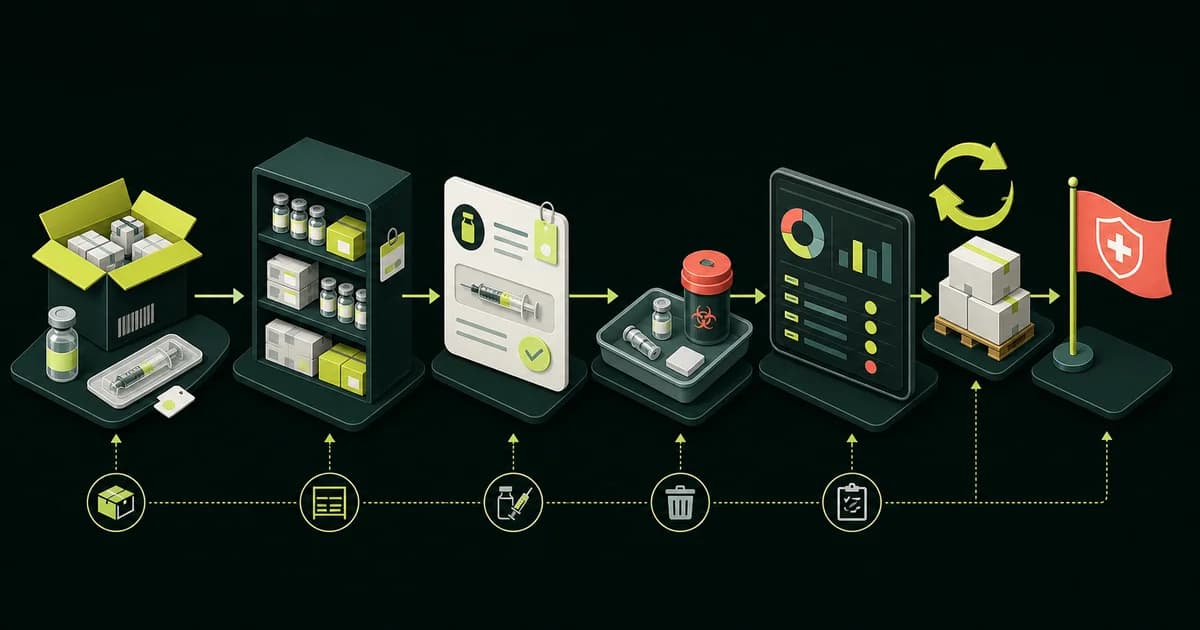
Editorial method: Our team reviewed current FDA and HHS guidance plus official Aesthetic Record and Zenoti product documentation on July 28, 2026. We report vendor capabilities only when a linked source supports them and did not conduct hands-on product tests. The scorecard and 52-point checklist are original editorial tools. The featured workflow illustration was generated for TheClinify with OpenAI ImageGen and contains no vendor assets. This guide is not clinical, legal, security, pharmacy, or compliance advice.
- Build the catalog around the clinic's real units, locations, and product classes before comparing dashboards.
- Use lot, batch, serial, expiration, or patient-level links only where the product workflow and clinic policy require them.
- Make every finalist prove the same receipt, use, adjustment, count, recall, and export script.
- Software can support documented controls, but it cannot decide the clinic's legal, pharmacy, security, or clinical duties.
What is medical aesthetics inventory software?
Medical aesthetics inventory software is a system for recording what a clinic receives, where it is stored, how it moves, when it is used or sold, why a count changes, and what remains available. The useful unit is not always one item. A clinic may buy by case or vial, use by unit or syringe, and report cost by treatment, location, or product class.
The category can sit inside an EMR or practice platform, a point-of-sale system, a standalone stock tool, or a custom operations layer. The right choice depends on where the authoritative patient, treatment, purchasing, and accounting records already live. The medical aesthetics software service page explains why public website infrastructure and internal clinic software have different jobs.
This guide narrows the broader software requirements checklist to one operational question: can the proposed system preserve inventory truth through normal work and awkward exceptions? It does not rank vendors, certify a product, or tell a clinic which regulatory rules apply.
| Inventory layer | Examples | Core record the system must preserve |
|---|---|---|
| Clinical products | Injectables, prescription items, treatment products | Receipt, location, unit, lot or expiration when required, use, adjustment, and disposition. |
| Retail products | Skincare and take-home products | SKU, quantity, cost, sale, return, transfer, reorder point, and tax treatment where applicable. |
| Consumables and devices | Tips, cartridges, dressings, PPE, single-use supplies | Pack size, issue or use, location, reorder point, and lot, serial, or UDI when relevant. |
What should the full inventory lifecycle look like?
A complete inventory workflow begins before an item reaches the shelf and ends only after use, sale, transfer, return, waste, or other disposition is recorded. Every stage needs one owner, one timestamped event, and one defined fallback. If staff must fix the count later from memory, the software is not supporting the actual workflow.
Use the featured illustration as a process map, then replace each generic stage with the clinic's roles, locations, product classes, and source systems. A receiving workflow may belong to operations, while treatment use may belong to the clinical record. The inventory system must join those events without forcing staff to invent duplicate product names or units.
| Stage | Required event | Acceptance question |
|---|---|---|
| Order and receive | Ordered and actual quantity, unit, condition, identifiers, cost, location, and receiver. | Can staff record a short shipment without inflating on-hand quantity? |
| Store and transfer | Exact room, cabinet, status, sender, receiver, and completed handoff. | Does stock have one authoritative location? |
| Reserve, use, sell, return, or waste | Exact unit, reason, lot when needed, appropriate source link, and responsible role. | Does every deduction have a source event and permitted user? |
| Count and reconcile | Physical count, expected count, variance, reason, approver, and correction. | Can the owner explain the difference without editing history? |
| Reorder or recall review | Threshold, supplier action, quarantine, affected stock, owner, and closure. | Can staff find relevant stock and prove what happened? |
Which data fields should every inventory record contain?
Every record needs enough identity, quantity, location, status, cost, and history to answer three questions: what is it, where is it, and why did the count change? The catalog should separate stable item data from batch-level data and transaction events. Otherwise, staff may overwrite a product record when only one shipment or location changed.
Use the smallest complete field set for each product class. Clinical products, retail stock, low-cost consumables, and reusable devices do not need identical rules. Define the purchase unit, use unit, allowed locations, identifier fields, count frequency, adjustment reasons, and required report before importing data.
| Data group | Fields to define | Demo test |
|---|---|---|
| Identity and quantity | Internal ID, category, SKU, relevant NDC or UDI, purchase unit, use unit, conversion, and precision. | Receive one pack, use a partial amount, and show the correct balance. |
| Traceability and location | Lot, serial, expiration, receipt, supplier, clinic, room, cabinet, and status when required. | Search one identifier and transfer it to one authoritative location. |
| Financial | Received cost, landed cost if used, retail price, waste value, and accounting mapping. | Explain which cost the owner report uses after two batches arrive at different costs. |
| History | Event type, quantity before and after, user, time, reason, approval, and linked record. | Correct an error without deleting or silently replacing the original event. |
How should lot, expiration, UDI, and recall tracking work?
Identifier tracking should support a specific clinic action, not decorate the record. The FDA says a drug recall notice may require matching the lot number on the label, and its recall database includes classification and reason information. That makes a lot search useful when the clinic needs to compare current stock and related records with a notice. See the FDA drug recall guidance.
Expiration and storage fields should preserve the label, not create a clinic-defined extension. The FDA explains that drug expiration dates are supported by stability testing and apply when the product is stored according to labeled conditions. Review the FDA expiration date questions and answers and the product's current labeling with the clinic's qualified professionals.
For applicable medical devices, an FDA UDI can contain a device identifier plus production information such as a lot, serial number, expiration date, or manufacturing date. The FDA also describes machine-readable UDI capture into computer systems. A buyer should test the actual labels it uses rather than assuming any barcode scanner will parse them correctly. See the FDA UDI basics.
- Search exact lot, batch, serial, SKU, NDC, or UDI values without relying on a product nickname.
- Separate available, quarantined, expired, returned, destroyed, and otherwise unavailable stock.
- Show current quantity by location and the movement history for the affected identifier.
- Identify related patient, treatment, or sales records only when that linkage is appropriate and authorized.
Which software category fits the clinic workflow?
Choose the software category after mapping ownership. An all-in-one clinic platform can reduce duplicate entry when treatment documentation should deduct stock. A standalone inventory tool may provide stronger purchasing or warehouse controls but require a reliable connection to charting and sales. A spreadsheet can establish the catalog, but it becomes fragile when several people, locations, or real-time events share the count.
A custom module makes sense only when the clinic has a narrow, stable workflow that standard products cannot support and can fund implementation, security, maintenance, and exit planning. It should not recreate an EMR, payment platform, or accounting system by accident. The cloud software and website infrastructure guide helps assign each system one job.
| Category | Strong fit signal | Main risk to test |
|---|---|---|
| All-in-one clinic platform | Inventory use should connect directly to the treatment, checkout, purchasing, and owner reports. | Broad feature set, plan limits, data export, and staff adoption. |
| Standalone inventory platform | Purchasing, batch control, scanning, transfers, or multi-location stock needs deeper operations tools. | Duplicate entry and weak links to the patient, treatment, POS, or accounting record. |
| POS or retail inventory | Retail sales, variants, returns, ecommerce, and location counts dominate the requirement. | Clinical products and lot or treatment traceability may not fit. |
| Spreadsheet with written process | One owner, low item count, one location, and low event volume during requirements discovery. | Simultaneous edits, missing audit history, formulas, permissions, and delayed counts. |
| Custom Portal module | A documented workflow, stable interfaces, named owners, acceptance tests, and a funded maintenance plan. | Custom code becomes another unsupported system of record. |
What do current vendor documents prove?
Official documentation is useful for building a shortlist, but it proves only the described capability on the documented configuration. Aesthetic Record's January 2026 stock management guide describes batch ID, expiration, stock in units, cost per unit, toxin units, filler syringes, and stock alerts. A demo should confirm the clinic's plan, locations, reports, and exception handling.
Zenoti's current batch and expiry guide says the feature applies to its on-hand quantity model, covers purchasing, transfer, consumption, audit, return, and adjustment actions, and orders batch choices by first expiry. That configuration caveat matters. Confirm which inventory model and permissions the proposed account will use.
Use four evidence levels in the decision file: a current official document, a live demo using the clinic script, an opened sample report or export, and a written order form or agreement. Each answers a different question. None proves staff adoption or performance after launch on its own.
How does the 100-point Inventory Evidence Score work?
Rate each finalist from 1 to 5 in the six areas below. Convert the rating to weighted points with this formula: rating divided by 5, multiplied by the category weight. A rating of 4 in a 25-point category earns 20 points. Score only the proposed plan and configuration, using evidence the clinic can keep.
We built this scorecard as an editorial decision tool, not an industry standard. Change weights before demos, not after a favorite product appears. A failed launch blocker should override the total. Give roadmap promises zero until the capability is live, included, priced, and demonstrated.
- Disqualify a system that cannot preserve the required unit conversion without manual math.
- Disqualify a system that lets unauthorized roles alter or erase required inventory history.
- Disqualify a system that cannot export the inventory and history the clinic must retain.
| Scorecard category | Weight | Evidence required for a top score |
|---|---|---|
| Traceability and unit integrity | 25 points | Correct item, unit conversion, location, lot or serial when needed, status, and event history. |
| Lifecycle workflow coverage | 20 points | Order, receive, transfer, reserve, use or sell, return, waste, count, reconcile, reorder, and recall review. |
| Controls and data governance | 20 points | Role permissions, approvals, audit history, scoped patient links, security answers, and written responsibilities. |
| Reconciliation and owner reporting | 15 points | Physical count, variance, cost logic, waste, on-hand value, movement, and usable reports. |
| Implementation and adoption | 10 points | Clean catalog, migration test, training by role, acceptance plan, support owner, and launch fallback. |
| Integration, export, and exit | 10 points | Documented connections, error handling, opened exports, retention, deletion, fees, and offboarding. |
What should every vendor prove in a live inventory demo?
Give every finalist the same sanitized script and actual label formats. Begin with a clean purchase or receipt, then follow one item through storage, transfer, partial use, adjustment, physical count, report, recall search, and export. Record clicks, duplicate entry, missing fields, workarounds, permissions, plan limits, and unresolved questions.
Run the demo with the staff who will receive, use, count, and review inventory. A prepared dashboard tour cannot show whether the front desk, provider, inventory lead, and owner agree on the same number. Use the broader medical aesthetics software buying guide for contract, migration, security, and decision-memo questions.
- Receive an order with a short shipment, two expiration dates, and two received costs.
- Move part of the stock between rooms or locations with a sender and receiver.
- Reserve or use a partial quantity in the correct unit without rounding away the balance.
- Record damaged, returned, expired, wasted, and corrected stock with distinct reasons.
- Attempt the same changes as an unauthorized role and inspect the audit history.
- Count the shelf, enter a variance, require approval, and preserve the original event.
- Search an exact lot or serial value, quarantine affected stock, and identify related records where appropriate.
How should counts, waste, and adjustments reconcile?
Reconciliation should explain the difference between expected and physical stock without hiding the original transactions. Use one equation for each item and location: beginning quantity plus receipts and inbound transfers, minus use, sales, outbound transfers, returns to supplier, and recorded waste, equals expected ending quantity. The physical count creates the variance, not a rewritten history.
Define allowed adjustment reasons and approval thresholds before launch. "Correction" is too vague on its own. Staff should choose a reason such as receiving error, unit conversion error, count correction, damaged item, expired item, documented waste, return, or transfer difference, then add the source record and approver required by clinic policy.
| Owner question | Required report detail | Failure signal |
|---|---|---|
| What is available now? | Item, unit, location, lot or status where needed, available, committed, and quarantined quantities. | One total mixes stock that cannot be used or sold. |
| Why did the count change? | Every event, source, user, time, quantity before and after, reason, and approval. | Staff can edit the balance without a durable explanation. |
| What was wasted or expired? | Item, batch when relevant, quantity, cost basis, reason, date, location, and approver. | Waste is folded into a generic adjustment. |
| What should be reordered? | Available quantity, committed quantity, lead time, threshold, supplier, open order, and exception. | The alert ignores open orders or fires on the wrong unit. |
What should privacy, security, and access controls cover?
Inventory becomes a health-data question when it links products to identifiable patient or treatment records. First determine whether the clinic and vendor relationship is subject to HIPAA and which data is ePHI. HHS says the current Security Rule applies to covered entities and business associates and requires reasonable and appropriate safeguards for ePHI. Use the HHS Security Rule summary with qualified advisers.
HHS specifically identifies access control and mechanisms to record and examine activity in information systems that contain or use ePHI. Translate that into a demo: create roles for receiving, provider use, count, adjustment approval, reporting, and administration. Then test an unauthorized action, a terminated user's access, an audit search, backup expectations, incident contacts, export scope, retention, and deletion.
Do not ask whether a product is "compliant" and stop there. Ask which party owns each safeguard, agreement, configuration, review, and response step. Software can supply controls, but the clinic must decide and operate the policy that uses them.
How should you compare first-year cost and implementation?
Compare the complete 12-month operating change, not the subscription alone. Include setup, catalog cleanup, imports, label or scanner work, locations, users, add-ons, messages, integrations, training, support, accounting work, temporary double entry, and staff time for physical counts. A low base price can still produce the higher implementation cost.
Put acceptance milestones in the rollout plan. Start with product classes and units, clean duplicates, import a sample, test actual labels, configure permissions, run a physical opening count, complete the live demo script in the configured account, and open the first reports and exports. Do not migrate every item before proving the model on a representative sample.
If the clinic is considering custom software, TheClinify's Portal offering is discovery-priced because modules, integrations, users, data responsibilities, and support scope vary. A custom inventory module still needs a system owner, threat and privacy review, acceptance tests, monitoring, backups, support, and an exit path.
How do you use the 52-point inventory checklist?
Download the 52-point medical aesthetics inventory software checklist. Mark every row Required, Conditional, or Out of scope. Assign one clinic owner, write a pass condition before the demo, and record the evidence the vendor shows. A feature name is not a pass condition.
Use the file during shortlist demos, configuration, migration testing, opening count, and launch approval. Keep it with the final quote, product catalog, unit-conversion map, role matrix, integration scope, training plan, and decision memo. Re-run the most important tests after any major catalog, location, interface, or plan change.
FAQ
Does every medspa need lot and expiration tracking?
No single rule fits every item or clinic. Use lot, batch, serial, UDI, and expiration fields when product labeling, clinic policy, a recall workflow, or an applicable requirement makes them necessary. Confirm the exact duties with qualified clinical, pharmacy, legal, and compliance advisers.
Can a spreadsheet manage medical aesthetics inventory?
A spreadsheet can help one owner define the catalog, units, locations, and opening count. Risk rises when several people or locations need real-time updates, permissions, durable history, treatment links, scanning, or rapid recall searches. Test the operating volume and exception handling before relying on it.
Should inventory software connect to the patient chart?
Connect inventory to an identifiable patient or treatment record only when the clinic workflow requires it and the data relationship has been reviewed. The connection should deduct the correct unit, preserve the required identifier, limit access by role, and avoid copying sensitive data into systems that do not need it.
What is first-expire, first-out inventory?
First-expire, first-out, often shortened to FEFO, prioritizes eligible stock with the earliest expiration date. Software can sort or prompt the choice, but the clinic still needs accurate expiration data, storage status, staff training, and a process for exceptions.
Can inventory software make a clinic compliant?
No. Software may provide fields, permissions, audit history, agreements, reports, and other controls, but it cannot determine every duty or operate the clinic policy. Evaluate the exact products, services, state rules, data, vendor relationships, and professional responsibilities with qualified advisers.
Need an inventory workflow standard software cannot support?
Bring your product classes, locations, units, reports, and required integrations. We can define whether a focused custom Portal module belongs in the stack.
Request a Portal discovery call