Clinic Management Software Implementation: A 2026 Checklist
Implement clinic management software with a six-gate plan, role-based testing, a 48-control launch ledger, and clear go-live evidence for US clinics today.
Reviewed by Abdullah Wasim. On August 28, 2026, we checked the current ONC Health IT Playbook, the SAFER Guides updated February 27, 2026, HHS risk-analysis guidance reviewed August 12, 2026, HHS cloud guidance, and the HHS software-vendor FAQ. Search results confirmed intent only; competitor pages were not evidence.
The six-gate board and 48-control ledger are original editorial tools, not benchmarks, certifications, legal standards, or substitutes for qualified review. No clinic implementation, patient data, migration, security program, or launch was tested.
AI helped organize research and drafting; the team reviewed the sources, logic, code, and wording. OpenAI ImageGen created the artwork without a vendor interface, logo, patient asset, or clinical scene. This is not clinical, legal, privacy, security, records-management, tax, or compliance advice.
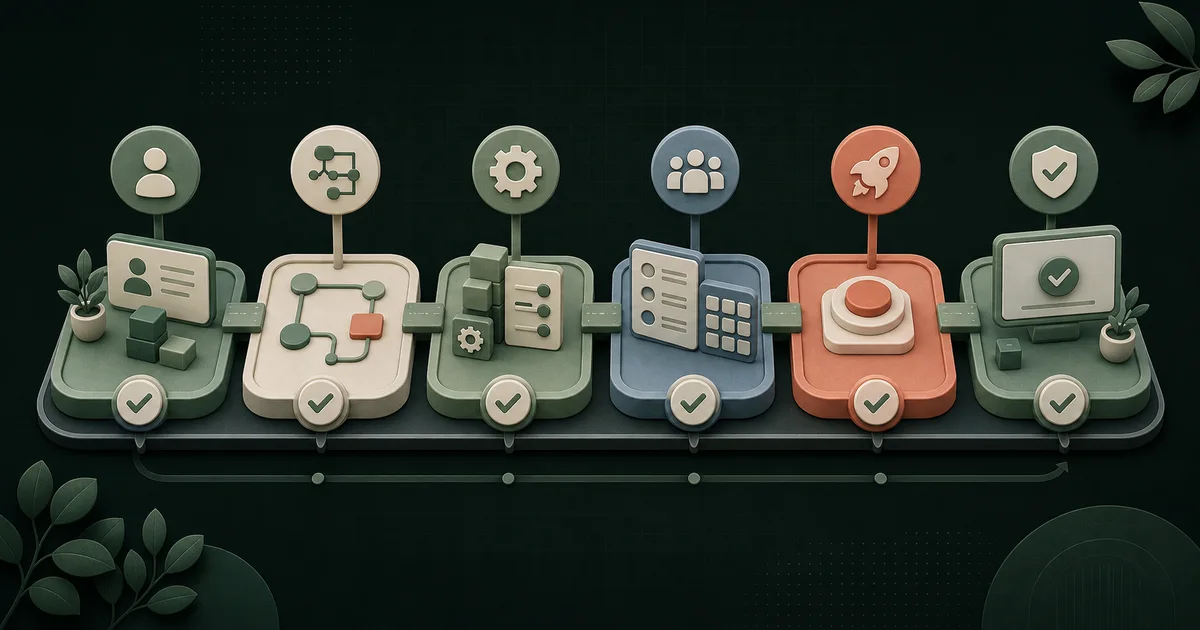
- Treat implementation as an operating change with named clinic owners, not as a vendor setup task.
- Pass six gates with written evidence before launch: ownership, workflow, configuration, data, rehearsal, and stabilization.
- Train the owner, front desk, providers, finance, and privacy or security lead on their own work and failure cases.
- Use the 48-control evidence ledger to record pass, fail, owner, proof, blocker, and follow-up without turning the checklist into a compliance claim.
What should clinic management software implementation include?
Clinic management software implementation is the work of making a new system usable in day-to-day clinic operations. It covers ownership, workflow design, configuration, access, representative data checks, role-based training, end-to-end testing, a go or no-go decision, downtime planning, and post-launch support. Installation is only one task. Staff must be able to run the agreed work and recover from realistic exceptions without the implementation team taking over.
The US Office of the National Coordinator for Health Information Technology divides EHR adoption into pre-implementation and implementation work. Its current Health IT Playbook calls for governance, planning, staff communication, workflow redesign, training, system tailoring, support, mock go-lives, and testing. Not every clinic system is an EHR, but this operating discipline transfers well.
Start after the software decision is documented. If the clinic is still comparing products, use the medical aesthetics software buying guide. If requirements are still vague, complete the aesthetic clinic software requirements checklist before configuration begins. This guide starts where those decisions end.
How should the clinic define success before configuration?
Write three to five operating outcomes before anyone creates users or imports data. Each outcome needs an owner, a baseline or current failure, a target state, and evidence the owner can inspect. For example, "launch the new system" is a milestone. "Front desk can correct a duplicate booking and reconcile the deposit without administrator help" is an acceptance outcome.
Use real clinic work, but keep test data sanitized until the approved environment and data process are ready. Cover the public handoff, staff task, provider action, patient or client communication, payment or package event, report, correction, and exit record that matter to the chosen scope. Do not make every future wish a launch condition.
Who owns each implementation decision?
The clinic must own operating decisions even when a vendor performs the setup. Name one decision owner for scope, one implementation lead for the plan, and role owners for front desk, providers, finance, data, and privacy or security where applicable. The vendor can explain the product. It should not silently decide the clinic's clinical, financial, privacy, or records policies.
ONC's 2025 SAFER Guides separate organizational responsibilities, system management, contingency planning, patient identification, communication, and other safety topics. That structure supports a cross-functional project. It also warns against treating health technology as an isolated IT purchase.
What does the six-gate launch board control?
A launch gate is an evidence check that controls whether the project can move forward. The original six-gate board keeps a date or percentage-complete status from becoming the launch decision. Each gate names owners, evidence, and a stop signal. It can pass with documented limitations, but not on a demo, verbal promise, or roadmap item alone.
Download the original 48-control clinic software implementation ledger. Tailor it before the project starts. Mark controls Required, Conditional, or Out of scope, then record the evidence link, result, blocker, and approval without entering patient information in the worksheet.
- 1Gate decision
Ownership and outcomes
Does the project have a bounded scope, named authority, success measures, and an issue path?
- Accountable owners
- Sponsor, implementation lead, department owners.
- Evidence to pass
- Charter, decision log, outcome sheet, escalation map.
- Stop signal
- No one can approve a tradeoff or define success.
- 2Gate decision
Workflow and source map
Does every launch workflow name its system of record, handoffs, exceptions, and fallback?
- Accountable owners
- Front desk, provider, operations, data owners.
- Evidence to pass
- Workflow map, field dictionary, event ownership, exception scripts.
- Stop signal
- Two systems own the same event or a handoff has no owner.
- 3Gate decision
Configuration and access
Do locations, services, resources, roles, rules, messages, and reports match approved decisions?
- Accountable owners
- System administrator and each role owner.
- Evidence to pass
- Configuration register, role matrix, screenshots, test results.
- Stop signal
- Shared accounts, unknown defaults, or unreviewed production changes.
- 4Gate decision
Representative data
Can the clinic trace a representative sample from source through import, use, correction, report, and export?
- Accountable owners
- Data owner, department owners, vendor migration lead.
- Evidence to pass
- Mapping, totals, exceptions, opened files, signed validation.
- Stop signal
- Missing relationships, unexplained totals, or no usable recovery path.
- 5Gate decision
Role rehearsal and launch
Can staff complete a clinic-day script, failure cases, downtime work, and recovery without the trainer operating for them?
- Accountable owners
- Role leads, implementation lead, support owner.
- Evidence to pass
- Attendance, script results, defects, downtime test, go or no-go record.
- Stop signal
- Priority work fails or only the implementation team can finish it.
- 6Gate decision
Stabilization and handoff
Are defects controlled, reports reconciled, access reviewed, documentation current, and ongoing ownership accepted?
- Accountable owners
- Operations owner, system owner, vendor support.
- Evidence to pass
- Issue trend, reconciliations, runbook, owner sign-off, improvement backlog.
- Stop signal
- Unowned high-impact defects or no support and rollback boundary.
A pass means the named clinic owner reviewed the evidence for the agreed scope. The board does not certify security, privacy, compliance, clinical safety, data completeness, or vendor performance.
How should workflows and sources of truth be mapped?
Map events, not department names. Start with one appointment and identify which system owns the service catalog, availability, patient or client profile, intake, consent, clinical record, payment, inventory use, message, and owner report. Then map reschedule, cancellation, no-show, refund, duplicate, correction, failed message, failed integration, and downtime.
Give each handoff four fields: source, destination, trigger, and owner. Add the identifier that keeps records connected and the evidence that proves the transfer worked. "Integrates with" is not enough. The team should know whether the connection is a link, embed, file, native connector, API, manual task, or custom code.
Keep focused systems within their boundaries. The medspa patient portal guide covers authenticated journeys and communication. The medical aesthetics inventory software guide covers lot, expiry, unit, location, correction, and recall evidence. A launch map should point to those workflows rather than compress them into one vague box.
How should configuration and access be tested?
Test configuration as a set of clinic decisions: locations, time zones, services, durations, resources, provider eligibility, deposits, cancellation rules, forms, message timing, inventory units, package logic, taxes, reports, and integrations. Record the approved value, approver, environment, change date, and test. Defaults deserve the same review as custom settings.
For organizations subject to the HIPAA Security Rule, HHS says risk analysis must assess potential risks and vulnerabilities to the confidentiality, integrity, and availability of ePHI. Its current risk-analysis guidance connects that assessment to backup decisions, encryption, data integrity, and transmission protection. This checklist cannot determine what is reasonable for a specific clinic.
Cloud responsibility is shared, not transferred. HHS cloud-computing guidance says customer and cloud provider responsibilities can depend on their risk plans and agreement, and recommends confirming the division in writing. Test unique accounts, approved roles, administrator access, authentication, removal, audit history, and support access against that written boundary.
- Create one test account per role instead of reusing an administrator view.
- Prove what each role can create, view, change, approve, export, and delete.
- Remove a user and confirm active sessions, connected apps, and delegated access behave as expected.
- Record who can change high-impact settings and how the clinic reviews those changes.
- Confirm the vendor support path for access, incidents, urgent defects, and after-hours escalation.
How much data should move before launch?
Move only the data approved for the target workflow, retention decision, and launch plan. Start with a representative sample that includes ordinary records plus difficult cases: duplicates, missing values, inactive records, attachments, credits, packages, custom fields, historical appointments, and relationships between records. The correct sample size depends on the clinic's data and risk.
Validate meaning as well as counts. A file can have the expected number of rows while dates, units, balances, statuses, notes, or relationships are wrong. Department owners should open the result in the new system, complete the workflow, run the report, correct a record, and inspect a fresh export outside the product.
Keep detailed cutover, rollback, patient communication, and historical-record decisions for the separate migration plan. Implementation and migration overlap, but they serve different intents. This page asks whether imported data supports launch; the next guide will cover the move between systems.
How should each clinic role train?
Train by role and task, then test without coaching. For example, a front-desk user does not need the same session as a provider or finance owner. Each role should complete normal work, one high-risk exception, one correction, access or escalation steps, and the downtime procedure that applies to that role. Attendance is not evidence of competence.
Use a training environment or sanitized records where available. If the clinic must train in production, define how test records are labeled, isolated, and removed under its approved process. Keep short job aids beside the task, not a broad recording that forces staff to search through an hour of unrelated setup.
| Role | Minimum rehearsal | Evidence |
|---|---|---|
| Owner or practice manager | Approve scope, view daily controls, resolve an exception, read the issue log, and make a go or no-go decision. | Signed decision record and owner-readable report. |
| Front desk | Book, reschedule, cancel, correct, collect the approved fields, route a message, and use the fallback. | Completed role script without trainer takeover. |
| Provider | Open the correct record, complete the approved workflow, correct an entry, and locate unfinished work. | Provider sign-off on configured workflow and exception. |
| Finance or operations | Reconcile appointment, payment, refund, fee, package or membership, payout, and report. | Documented variance or matching total with source records. |
| Privacy or security lead | Review access, vendor boundary, audit history, incident path, retention, and offboarding. | Approved risk and responsibility records for the specific circumstances. |
What should a full clinic-day rehearsal prove?
A clinic-day rehearsal is an end-to-end test of one operating day across roles and systems. It must include predictable failures. Start with a morning access check and end with reconciliation, unfinished-work review, backup or export evidence, and handoff to the next day. The implementation team observes, timestamps defects, and answers through the agreed support route.
Use sanitized scenarios and the configured environment. Do not treat a vendor's polished demonstration as the rehearsal. Staff must operate their own accounts, devices, printers, scanners, payment hardware, booking path, messages, reports, and integrations where those items are in scope.
- A new inquiry reaches the intended queue and receives only the approved response.
- An appointment selects the correct location, service, duration, resource, provider type, and policy.
- A staff member corrects a duplicate or wrong selection without losing the audit trail expected by the clinic.
- A failed payment, message, printer, integration, or login reaches a named owner and fallback.
- The provider and front desk see the same agreed status after the handoff.
- The owner report reconciles to the underlying appointment and financial events.
- Downtime work is captured and entered through the approved recovery process.
What makes a go or no-go decision defensible?
A go or no-go decision is the sponsor's recorded approval or rejection of launch. The record should show scope, passed controls, open defects, workarounds, support coverage, rollback boundaries, and owners. A date, vendor confidence, or training attendance should not outweigh a failed priority workflow.
The ONC SAFER collection currently contains eight guides, including organizational responsibilities, system management, contingency planning, patient identification, and clinician communication. ONC states that the guides are self-assessment resources, not legal compliance tools. Use the relevant parts to prompt questions, then apply the clinic's own policies and qualified review.
Define severity before testing. A label should describe impact, affected role or workflow, available workaround, owner, and decision deadline. Do not hide a launch blocker by calling it a future enhancement. Do not block launch for a cosmetic issue that has a safe workaround and a scheduled owner.
| Decision state | Meaning | Required record |
|---|---|---|
| Go | All required controls pass; conditional items have approved owners and dates. | Signed gate record, support plan, and launch communication. |
| Go with limitation | The workflow can operate safely under the clinic-approved boundary and documented workaround. | Accepted limitation, affected users, workaround, monitor, and removal date. |
| No-go | A priority workflow, access, data, reconciliation, downtime, or support control has no acceptable path. | Blocker, owner, correction plan, retest evidence, and next decision date. |
How should launch week and stabilization work?
Launch week needs a command path, not a crowded chat. Publish the support hours, contact method, severity rules, backup contact, decision owner, known limitations, and status cadence before the first live task. Freeze optional configuration changes so new defects can be traced to a known state.
Review stabilization daily at first, then less often when the evidence supports it. Check priority defects, unresolved handoffs, corrections, failed messages or integrations, report variances, access changes, and staff questions. This editorial operating model is not a universal clinical or security threshold.
Close stabilization only when the clinic owner accepts the runbook, department leads accept their workflows, high-impact defects are resolved or formally bounded, reports reconcile, access has been reviewed, and the remaining backlog has owners. ONC's Playbook treats optimization as ongoing work after implementation, so closure should transfer ownership rather than declare the system finished forever.
How should you budget time and implementation cost?
Budget by workstream, dependency, and owner instead of copying an industry timeline. Include setup, data cleanup, integrations, hardware, testing, training, parallel operation, support, staff time, corrections, stabilization, and exit preparation. A short setup can still require substantial clinic labor.
TheClinify's managed custom clinic website offer is $2,499 setup plus $499 per month. Custom Portal software is separate and discovery-priced because modules, users, integrations, data responsibilities, support, and launch work vary. The medical aesthetics software and website infrastructure page explains which work belongs in the public growth layer and which belongs in clinic operations.
Which implementation mistakes create the most rework?
Verify the vendor boundary before access. The HHS software-vendor FAQ says selling software alone does not create a business-associate relationship, but a vendor that needs PHI access to provide its service can be a business associate and would require an agreement before access. The clinic must determine how that guidance applies to its own status and workflow.
- Letting the vendor become the only person who understands the configuration.
- Changing scope after configuration without updating tests, cost, and launch decisions.
- Training everyone on features instead of each role on work and exceptions.
- Testing happy paths while skipping correction, downtime, support, and exit.
- Using shared accounts or broad administrator roles to make the demo easier.
- Reconciling only subscription cost while ignoring staff time, integrations, hardware, and double-running.
- Calling a missing requirement an enhancement after the launch date is announced.
What should the clinic keep after handoff?
Keep one controlled implementation record. Include scope, requirements, workflow and source maps, configuration, access, agreements, risk records, test and training evidence, issues, launch decision, downtime procedure, support contacts, exports, runbook, and backlog. Named owners should be able to access it under the clinic's approved process.
FAQ
How long does clinic management software implementation take?
There is no responsible universal duration. Scope, locations, roles, configuration, data condition, integrations, hardware, training capacity, vendor availability, and launch risk change the schedule. Build the timeline from dependencies and acceptance gates, then publish date ranges only after owners confirm inputs and support coverage.
Who should lead a clinic software implementation?
A clinic-side implementation lead should manage the plan and evidence, backed by an executive sponsor who can approve scope and tradeoffs. Front desk, providers, finance, data, and privacy or security owners must approve their own workflows. The vendor should not become the clinic decision maker.
Should a clinic run old and new software at the same time?
Temporary double-running can reduce some continuity risk, but it also creates duplicate work and conflicting records. Use it only with a written duration, source-of-truth rule, reconciliation method, staffing plan, cost, and exit condition. The separate migration guide will cover cutover and rollback in more detail.
Is clinic management software automatically HIPAA compliant?
No product label can establish clinic-wide compliance. A clinic must evaluate its own status, data, workflows, configuration, vendors, agreements, safeguards, and ongoing operation with qualified advisers. HHS guidance also shows that some cloud security responsibilities may be divided between the customer and provider in writing.
Does your clinic need a custom operating layer?
Bring the current workflow, system boundaries, required roles, integration questions, and launch constraints. We will separate what belongs in existing software, the public website, or a custom Portal scope.
Request a Portal discovery call