Medical Practice Software Migration: A Patient-Safe Cutover Plan
Plan a medical practice software migration with six gates for data mapping, test conversions, cutover, rollback, patient continuity, and final sign-off.
Reviewed by Abdullah Wasim. On September 14, 2026, we checked the current ONC Health IT Playbook, ONC EHR migration resources, HHS cloud, access, and Security Rule guidance, NIST SP 800-88 Revision 2, and the NHS England clinical system migration guide. The NHS source is used only for practical cutover operations, not as US law. Search results confirmed intent only; competitor pages were not evidence.
The six-stage control room and 44-control ledger are original editorial tools, not standards, certifications, or universal risk thresholds. No clinic account, patient data, export, conversion, cutover, rollback, security program, or live migration was tested.
AI helped organize research and drafting; the team reviewed the sources, logic, code, and wording. OpenAI ImageGen created the featured artwork without a vendor interface, logo, patient asset, or clinical scene. This article is not clinical, legal, privacy, security, records-management, tax, or compliance advice.
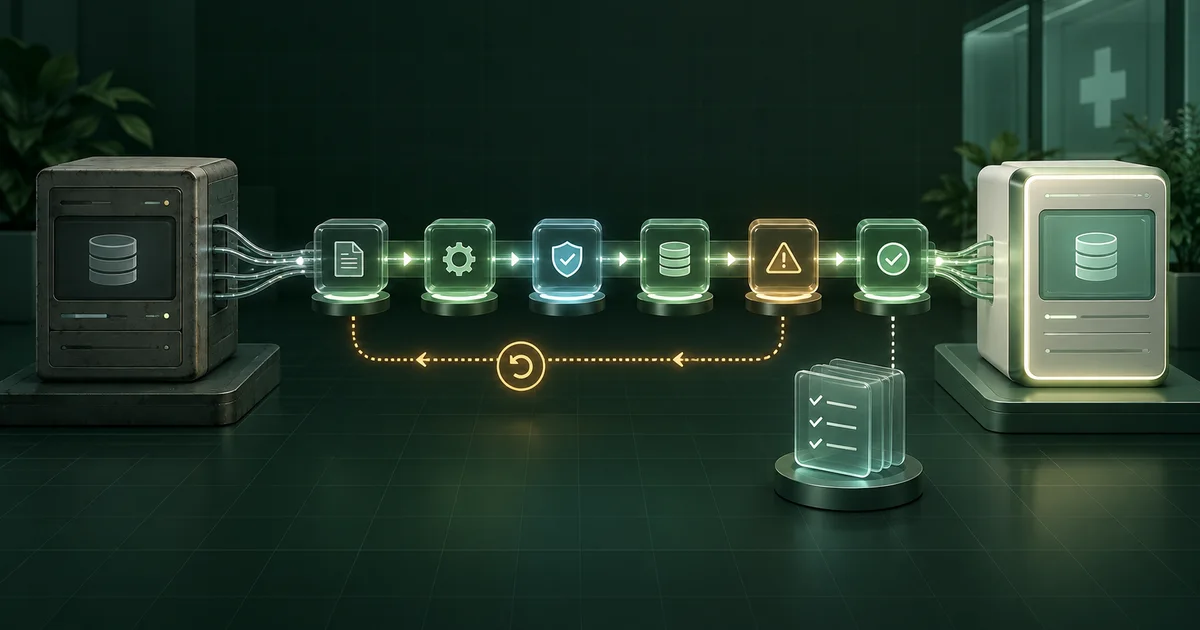
- Treat data conversion, clinic cutover, and legacy-system retirement as separate decisions with separate evidence.
- Use six controlled stages: scope, mapping, test conversion, cutover, stabilization, and retirement.
- Keep a delta ledger for every appointment, payment, message, form, and record change created after the final extract.
- A rollback plan needs a decision owner, trigger, recoverable system state, reconciliation method, and tested communication path.
What is a medical practice software migration?
A medical practice software migration moves agreed data and daily work from one clinic system to another. It includes scope, export, mapping, conversion, validation, cutover, downtime work, rollback, reconciliation, and controlled retirement of the old environment. A successful import is not enough. Staff must be able to find the right record, complete priority work, and account for every change made during the transition.
The US Office of the National Coordinator for Health Information Technology says migration from one electronic environment to another requires careful planning so the new EHR can integrate and access historical data. Its Health IT Playbook migration section also points practices to contract terms covering data portability, transfer, conversion, licensing, and transition support. Not every medspa system is an EHR, but those questions still expose operational risk.
Migration starts after requirements and product selection. Use the medical aesthetics software buying guide if vendors are still being compared. Use the clinic management software implementation checklist for broader configuration, access, training, and launch ownership. This plan stays focused on the data move and the cutover between systems.
What must be decided before the old vendor receives notice?
Confirm exit rights before creating a migration date. The clinic needs the contract, data ownership terms, export formats, export fees, extraction lead time, support window, read-only access period, termination date, deletion process, and responsibility for third-party connections. Record what the current and new vendors will do, what the clinic must do, and which work is billed separately.
For a HIPAA covered entity or business associate using cloud services for ePHI, HHS says the business associate agreement and any service-level agreement should address availability, backup and recovery, data return after service termination, security responsibility, and use or retention limits. Review the current HHS cloud guidance with qualified advisers for the clinic's status and facts.
- Name one clinic executive who can approve scope, delay cutover, or activate rollback.
- Name owners for clinical records, scheduling, finance, inventory, messaging, integrations, and patient communications where applicable.
- Freeze contract assumptions in a written migration responsibility matrix.
- Keep credentials, patient information, and raw exports out of general project chat and shared checklists.
How does the six-stage migration control room work?
A migration control room is the clinic's shared decision view for scope, evidence, stop conditions, and ownership. It does not replace the detailed project plan. It keeps technical progress from hiding an unresolved operating risk. Each stage passes only when the named clinic owner can inspect the agreed evidence and explain what happens if the next step fails.
Download the original 44-control clinic software migration ledger. Tailor it before entering dates. Mark each control Required, Conditional, or Out of scope. Store only an evidence reference, owner, status, blocker, and decision in the sheet. Keep patient information inside the clinic's approved systems and handling process.
- 1Control stage
Scope and exit
Define source systems, record scope, contract boundaries, access windows, and decision authority.
- Command owner
- Executive sponsor and migration lead.
- Evidence to pass
- Scope register, contract matrix, source inventory, approved exclusions.
- Rollback trigger
- Export rights, retention, ownership, or source access remains unclear.
- 2Control stage
Map and prepare
Map fields, identifiers, relationships, transformations, exceptions, and delta events.
- Command owner
- Data owner and workflow owners.
- Evidence to pass
- Field dictionary, transformation rules, exception list, reconciliation plan.
- Rollback trigger
- A priority record or relationship has no destination or handling rule.
- 3Control stage
Test conversion
Run representative conversions and prove records, reports, workflows, corrections, and exports.
- Command owner
- Clinical, operations, finance, and vendor leads.
- Evidence to pass
- Test results, issue log, corrected rerun, owner sign-offs.
- Rollback trigger
- Unexplained totals, wrong relationships, or repeatable high-impact defects.
- 4Control stage
Cutover and continuity
Control the final extract, delta ledger, linked systems, staff fallback, communication, and launch decision.
- Command owner
- Cutover commander and role leads.
- Evidence to pass
- Timed runbook, final backup, delta capture, contact tree, go decision.
- Rollback trigger
- Priority work, access, recovery, or delta capture cannot operate as approved.
- 5Control stage
Stabilize and reconcile
Re-enter deltas, reconcile priority totals, clear defects, review access, and transfer support ownership.
- Command owner
- Operations owner and department owners.
- Evidence to pass
- Reconciliations, defect trend, delta closure, accepted runbook.
- Rollback trigger
- New work cannot be trusted or a critical backlog has no controlled workaround.
- 6Control stage
Retire and retain
Preserve required access, export final evidence, remove connections, and retire media under approved policy.
- Command owner
- Records, privacy, security, and system owners.
- Evidence to pass
- Retention decision, final export test, access closure, retirement record.
- Rollback trigger
- The clinic cannot retrieve required history or prove an approved disposition path.
A stage passes when the responsible clinic owner accepts the evidence for the approved scope. The control room does not certify data completeness, security, privacy, compliance, clinical safety, or vendor performance.
How should source data and dependencies be inventoried?
Inventory business events, not product menus. Start with a booked appointment and follow every system that creates, changes, receives, or reports it. Repeat the exercise for a patient or client profile, intake, consent, clinical documentation where applicable, payment, refund, package or membership, inventory use, message, image, attachment, lead source, and owner report.
| Inventory layer | Question to answer | Evidence before mapping |
|---|---|---|
| Records | Which records and date ranges must move, remain accessible, or stay behind? | Approved scope and exclusion register. |
| Relationships | Which identifiers connect appointments, people, services, payments, notes, files, and corrections? | Relationship map with sample records. |
| Interfaces | What sends or receives bookings, forms, messages, images, payments, or reports? | Connection inventory with owners and restart order. |
| Operations | What can staff do during the extract and import window? | Downtime procedures and delta ledger. |
| Exit | How will the clinic retrieve history after termination? | Tested export, read-only terms, retention decision, and support contacts. |
How should fields, records, and transformations be mapped?
Map meaning before format. A field called Status may mean appointment state in one system and account state in another. Record the source field, business definition, destination field, transformation, allowed values, owner, test case, and treatment of blanks or invalid values. Preserve the source identifier when the destination allows it so a reviewer can trace a converted record back to its origin.
Decide how to handle duplicates, inactive profiles, merged records, archived staff, free-text notes, calculated balances, packages, credits, memberships, signed artifacts, time zones, historical service names, and deleted or corrected entries. Do not silently coerce an exception into the closest destination value. Put it in an exception queue with an owner and due date.
How should a test conversion be validated?
Validate sample records in the new system rather than relying on exported files alone. Include ordinary records and difficult cases. Owners should compare source and destination, open attachments, follow relationships, complete the workflow, make a correction, run the report, and create a fresh destination export. Repeat the conversion after fixes until the clinic accepts the result or stops the project.
NHS England's current clinical system data-checking guide uses an initial review, a supplier correction, and a recheck before sign-off. That guide is written for NHS practices, so it is not US law or a universal timeline. Its practical lesson is sound: the practice, not the supplier alone, must inspect the converted data and report unresolved impact.
Use counts, totals, and samples together. Reconcile record counts by type and status, financial totals by the clinic's approved method, appointment volumes, file counts, and exception counts. Then inspect high-impact and unusual records selected by accountable owners. A matching total can still hide records assigned to the wrong person, date, service, location, or balance.
- Record the exact source extract, transformation version, destination build, and test date.
- Require owners to sign their domain, not one project lead to sign everything.
- Retest every corrected rule against the original failure and a nearby normal case.
What belongs in the cutover and delta plan?
Cutover begins when the final source extract creates a gap between what was copied and what continues to happen in the clinic. The cutover plan must state when each system becomes read-only, which work continues, where new events are recorded, who re-enters them, how completion is reconciled, and who can pause or reverse the move.
NHS England's final data production and cutover guidance tells practices to log interactions during the cutover for later entry into the new live system. Again, this is an operational reference rather than US legal guidance. A US clinic should tailor the same control to its workflows, approved safeguards, and qualified advice.
Build a delta ledger before the final extract. Include appointments, changes, calls, forms, consents, notes, payments, refunds, packages, messages, documents, inventory events, new profiles, corrections, and failed interfaces that occur after the cutoff. Give every item an identifier, timestamp, source, owner, destination status, reviewer, and closure evidence. Test the ledger during rehearsal.
When should the clinic roll back instead of pushing forward?
Rollback is a business decision supported by technical recovery. Define the last reversible point, the system of record before and after it, the person who can call rollback, and the events that trigger the decision. Then test how staff resume work, how post-cutoff changes are preserved, and how the team reconciles activity after recovery.
For organizations subject to the HIPAA Security Rule, the current HHS Security Rule summary says contingency planning includes backup, restoration of lost data, and continuation of critical business processes that protect ePHI in emergency mode. A vendor statement that backups exist does not prove the clinic's own cutover recovery will work.
| Trigger example | Immediate decision | Evidence needed before resuming |
|---|---|---|
| Priority users cannot access the new system | Pause new-system work and activate the approved fallback. | Verified access or restored operating path for each priority role. |
| Converted records or relationships are unreliable | Stop use of affected data and preserve both system states. | Corrected conversion, rerun results, owner recheck, and delta reconciliation. |
| Payments, bookings, or messages do not reconcile | Bound the affected workflow and decide whether full rollback is required. | Matched totals, corrected interfaces, exception ownership, and approval. |
| Rollback cannot preserve new activity | Do not cross the irreversible point. | Tested capture and replay method with named reviewers. |
How should staff, patients, and connected vendors be prepared?
Communicate only confirmed operational changes. Staff need the cutoff, affected tasks, fallback location, support path, issue severity rules, and source of truth. Patients need a plain explanation only when booking, forms, messages, payments, portal access, or appointment handling will change. Avoid technical detail that creates confusion without helping them act.
Connected vendors need a restart plan. List booking widgets, website forms, phone and message systems, payment services, labs or external clinical connections where applicable, accounting exports, inventory links, marketing automations, imaging, document tools, and reporting feeds. Name who disables, tests, and re-enables each connection and in what order.
What should happen on go-live day?
Run go-live day from a timed command sheet. Start with access, system status, final extract identity, backup evidence, priority data checks, and connection status. Then let each role complete a short opening script before normal volume begins. Record defects in one queue with time, impact, owner, workaround, and decision status.
| Checkpoint | Owner question | Pass evidence |
|---|---|---|
| Open | Can every priority role sign in and reach the correct location and records? | Role script results and access exceptions. |
| Operate | Can staff complete bookings, documentation, payments, messages, and corrections in scope? | Observed task results without trainer takeover. |
| Connect | Do approved integrations and public handoffs send data to the correct destination? | Test transactions and receiving-system evidence. |
| Reconcile | Do agreed counts, totals, statuses, and delta items match? | Signed reconciliation with owned exceptions. |
| Close | Can the next shift work from the current issue, support, and fallback record? | Updated runbook, support contacts, and handoff acceptance. |
How long should stabilization last?
Stabilization lasts until evidence supports normal ownership, not for a preset number of days. Review priority defects, failed connections, access changes, corrections, unmatched totals, delta backlog, staff workarounds, patient-facing issues, and vendor response each day at first. Reduce the review cadence only when owners accept the trend and remaining risk.
Close each delta item with two checks: the event exists correctly in the destination, and any dependent report or workflow reflects it. Reconcile payment and booking activity using the clinic's approved accounting method. Confirm that messages, files, packages, inventory events, and other scoped items reached the right owner and status.
When can the old clinic system be retired?
Retire the old system only after records, privacy, security, finance, operations, and vendor owners accept the retention and retrieval plan for the clinic's facts. Confirm contractual access, legal and policy obligations, open claims or balances, unresolved exceptions, historical reports, attachments, audit information, and the process for future patient access requests where applicable.
HHS says a HIPAA covered entity generally must provide access to PHI in designated record sets for as long as the information is maintained by the entity or on its behalf. The detailed HHS right-of-access guidance should be interpreted for the clinic by qualified advisers. Software migration does not erase that responsibility or create a universal retention period.
When storage media or hosted data reaches approved end of use, document the disposition path. NIST SP 800-88 Revision 2, published in September 2025, describes media sanitization as making access to target data infeasible for a chosen level of effort and calls for a program based on information sensitivity. It does not tell a clinic what it is legally allowed to destroy.
How should migration time and cost be budgeted?
Budget the work, not a generic duration. Include contract review, exports, data cleanup, mapping, conversion runs, attachments, integrations, hardware, training, downtime coverage, double-running, staff validation, corrections, vendor support, reconciliation, legacy access, and retirement. Publish a launch range only after dependencies, owners, and source quality are understood.
TheClinify's custom Portal software is discovery-priced because modules, users, integrations, data responsibilities, and support differ by clinic. The managed custom clinic website offer is separate at $2,499 setup plus $499 per month. The medical aesthetics software and website infrastructure page explains that boundary before a clinic scopes a Portal or changes its operational system.
Which migration shortcuts create the most risk?
The most expensive shortcut is assuming data that moved is data the clinic can trust. Conversion, cutover, and retirement need separate approvals. Keep scope changes, exceptions, manual work, and unproven vendor claims visible. If the clinic cannot state who owns a decision or show the evidence, the control is not complete.
- Canceling the old system before sample exports, access terms, and transition support are proven.
- Mapping field names without defining business meaning, relationships, blanks, and exceptions.
- Testing only ordinary records or letting the vendor select every validation sample.
- Using record counts as the only proof while skipping workflows, reports, attachments, and corrections.
- Starting cutover without a delta ledger for work created after the final extract.
- Calling a backup a rollback plan without testing recovery and reconciliation.
- Retiring the legacy system before approved retention, retrieval, and disposition decisions are complete.
FAQ
How long does a medical practice software migration take?
There is no responsible universal duration. Record volume, data quality, attachments, integrations, contract lead times, conversion cycles, staff availability, and risk change the schedule. Build the date from dependencies and acceptance evidence, then include time for at least one corrected test conversion and a controlled stabilization period.
Should every historical record move to the new clinic system?
Not automatically. The clinic should decide what must migrate, what can remain accessible in a legacy environment, what needs another approved archive, and what may be disposed of. Make those decisions with qualified records, legal, privacy, security, clinical, financial, and vendor input for the clinic's actual obligations.
What is the difference between rollback and downtime?
Downtime is the approved way staff continue priority work while a system or connection is unavailable. Rollback moves operations back to a prior system state or operating path after a cutover failure. Both need named owners, data-capture rules, communication, recovery steps, and reconciliation before the migration starts.
Who signs off a clinic software migration?
The executive sponsor makes the overall go or no-go decision, but domain owners should sign their own evidence. Clinical, front-desk, finance, data, integration, records, and privacy or security owners may all be needed. A vendor can provide conversion evidence, but it should not approve the clinic's operating risk for it.
Does your clinic need a custom Portal scope?
Bring your source systems, required workflows, integration questions, data boundaries, and cutover constraints. We will separate what belongs in the current vendor, the public website, or a custom Portal build.
Request a Portal discovery call